

QuickChart brand assets
Official logos, colors, typography, and product imagery for press, partners, and integrations. Everything here is ready to download and use within our brand guidelines.
Hero showcase
The home-page hero treatment — blurred clinical background, brand navy wash, and the live animated workspace — presented on its own for demos, screenshots, and partner embeds.
Ambient scribe
“…the shoulder pain started about three months ago, no specific injury…”
“…it's worse with overhead movement and at night when I lie on it…”
“On exam: positive Hawkins–Kennedy, weakness on empty-can testing…”
Feature menu
A poster-ready command menu that lays out the full QuickChart feature set at a glance — a still, non-interactive treatment built for print, decks, and partner materials.
- Ambient ScribeGenerates a structured clinical note from the visit automatically.
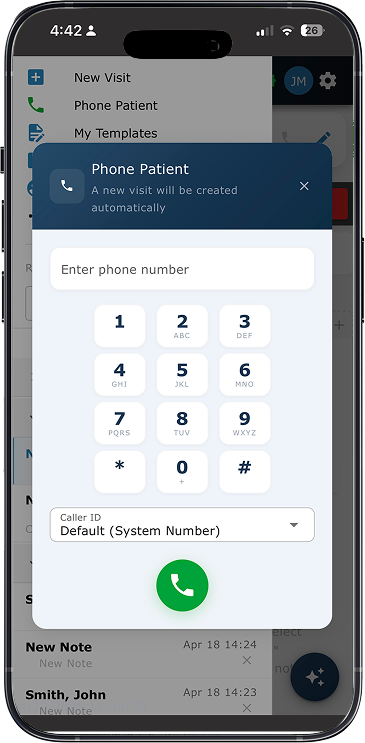
- TelehealthVideo and phone visits built right into the app.
- AI IntakeA voice agent gathers history before the patient is seen.
- Chart PrepReads PDFs, photos, and prior notes to organize the chart.
- QuickChart IntelligenceEvidence retrieval and decision support at the point of care.
- Post-Visit Safety ReviewFlags missed follow-ups and abnormal results after the visit.
- Prescriptions & FaxingSends prescriptions and referrals out by fax in a click.
- Forms & Form FillingAuto-fills requisitions and clinical forms for you.
Platform grid (high-contrast)
A bolder, static version of the “Everything you need in one platform” banner — deep navy backdrop with bright, high-contrast feature cards for maximum legibility in print.
Everything you need in one platform
From patient intake to the final note in the chart, QuickChart streamlines the entire clinical workflow.
Ambient Scribe
Generates a structured clinical note from the visit automatically.
Telehealth
Video and phone visits built right into the app.
AI Intake
A voice agent gathers history before the patient is seen.
Chart Prep
Reads PDFs, photos, and prior notes to organize the chart.
QuickChart Intelligence
Evidence retrieval and decision support at the point of care.
Post-Visit Safety Review
Flags missed follow-ups and abnormal results after the visit.
Prescriptions & Faxing
Sends prescriptions and referrals out by fax in a click.
Forms & Form Filling
Auto-fills requisitions and clinical forms for you.
Logos
Use the primary wordmark whenever possible. Choose the variant with the strongest contrast against its background.


The AI layer for Modern Healthcare
Always pair the tagline with the QuickChart wordmark or use it as a standalone statement in title-case. Keep the exact wording — don't abbreviate or reword it.
Tagline lockups
The wordmark paired with “The AI layer for Modern Healthcare” in approved color treatments. Each lockup is available as a transparent-safe PNG and a high-resolution JPG.


Primary logo on white (JPG)
High-resolution JPGs of the primary wordmark on a solid white background, for tools and documents that don't support transparency. Pick the framing that fits your layout.

Standard
2145 × 642Balanced clear space. The default choice for most documents and slides.
Download JPG











Color palette
Deep navy anchors the brand; bright blue drives calls to action. Click any value to copy the hex code.
#031B4E
Primary brand
#042460
Gradient / depth
#063380
Gradient / depth
#0693E3
Accent / CTA
#0578C2
Interactive hover
#0F172A
Body text
#FFFFFF
Surface / background
Typography
QuickChart pairs Satoshi for display headings with Nunito Sans for body copy and interface text.
Aa
Charting made effortless
ABCDEFGHIJKLM · abcdefghijklm · 0123456789
Aa
Nunito Sans keeps long-form clinical content and interface labels highly legible across screens and print, with a warm, approachable tone that fits a trustworthy medical product.
ABCDEFGHIJKLM · abcdefghijklm · 0123456789
Product imagery
Approved product screenshots for articles, decks, and partner pages. Please don't crop out or alter interface content.





Usage guidelines
A few simple rules keep the QuickChart brand consistent wherever it appears.
Keep clear space around the logo equal to the height of the “Q”.
Use the reversed logo on dark or photographic backgrounds.
Scale the logo proportionally so it always stays legible.
Don’t recolor, add gradients, or apply shadows to the wordmark.
Don’t stretch, rotate, or distort the logo in any direction.
Don’t place the light logo on low-contrast or busy backgrounds.
Company boilerplate
QuickChart MD is an AI-powered clinical documentation, telehealth, and patient intake platform built for healthcare providers. Trusted by more than 2,500 clinicians, QuickChart supports more than 1.5 million patient visits with ambient AI scribing, virtual care, and structured intake that keep clinicians focused on patients instead of paperwork.
For media inquiries, interviews, or additional assets, reach us at info@quickchart.ca.
Need something else?
Tell us what you're working on and we'll get you the right assets, quotes, or details.